
Linux · Network diagnostics · Licensed software
See what’s on the LAN.
Lan Scope.
RenniLink Lan Scope is a desktop discovery tool for engineers and clinical IT: host inventory (IP · MAC · vendor · hostname), open ports, bedside HL7/MLLP detection, encrypted-LAN TLS options, multicast checks, topology, switch L2 path, and routed path — with Excel / JSON export.
Free for non-commercial use on networks you are authorised to assess. Commercial use requires a paid licence — contact sales for pricing.
Direct link: https://pub-6660e5c6690145198ad9b73bf3d8a2c0.r2.dev/RenniLink-LanScope-0.1.0-linux-x64.zip
Free · non-commercial
Commercial · contact sales
rennilink.com
Free for non-commercial use.
Download Linux x64 zip
· Commercial:
Contact sales
Download
Get Lan Scope for Linux
Free for non-commercial use. By downloading you agree to
Licence, Legal notices, and the
LICENSE.txt / LEGAL-NOTICES.txt files inside the package.
Commercial use requires a paid licence —
contact sales.
Linux x86_64 (glibc)
Ubuntu, Debian, Fedora, RHEL, Arch, Mint, Pop!_OS, and most desktop distros. Package includes the installer plus licence and third-party notices.
Zip download:
https://pub-6660e5c6690145198ad9b73bf3d8a2c0.r2.dev/RenniLink-LanScope-0.1.0-linux-x64.zip
Object name on R2 must match exactly. If the link fails, the file is not on the download domain yet — email Contact sales.
After download
- Unzip the package (if you used the zip)
chmod +x RenniLink-LanScope-*-installer.run./RenniLink-LanScope-*-installer.run- Start:
rennilink-lan-scope
What is inside
- Self-contained installer (no system .NET)
LICENSE.txt·LEGAL-NOTICES.txtTHIRD-PARTY-NOTICES.txt- Install readme
Product screens
See the workspace
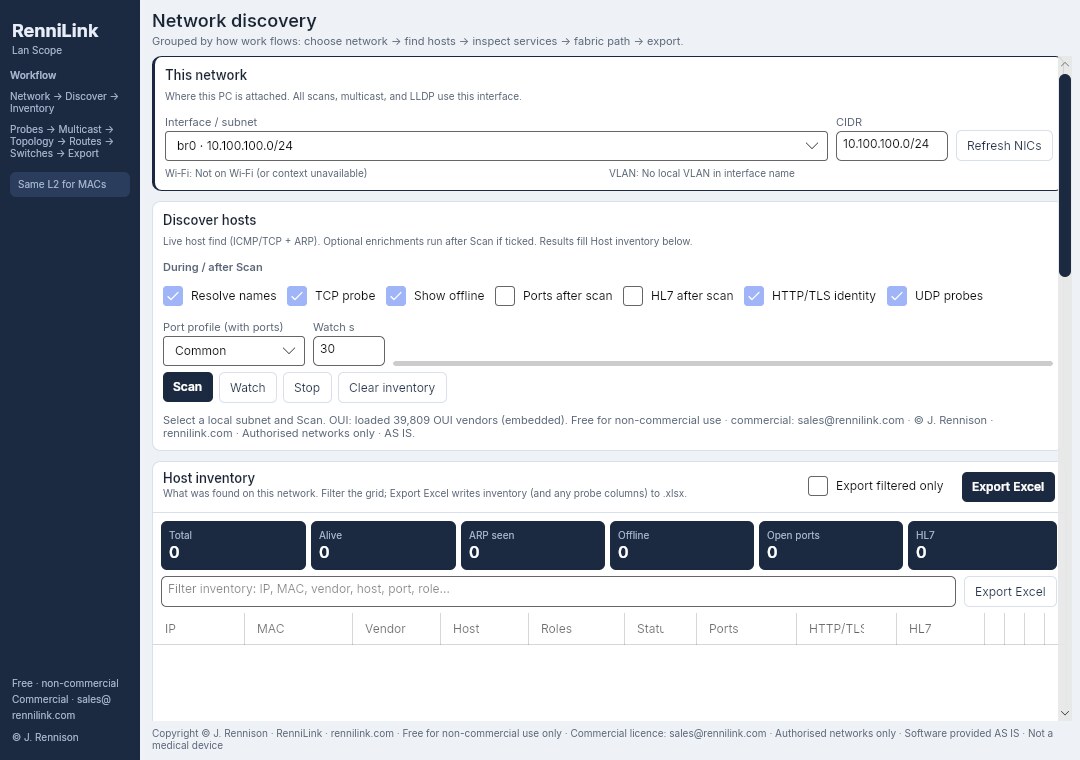
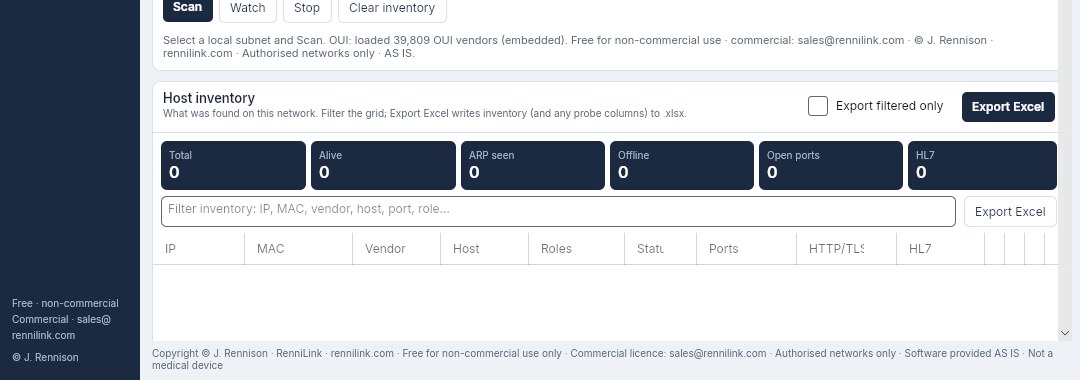
Real UI from the Linux desktop app. Click a screen for a larger view. Layout groups work by relationship: network → discover → inventory → probes → paths → export.
Functions
What Lan Scope does
All functions below are included under both non-commercial and commercial licences. Licence type governs who may use the software, not which buttons appear.
01
This network
Select interface and subnet (CIDR) and VLAN hints from names.
02
Discover hosts
ICMP and optional TCP probe, reverse DNS, optional ports / HL7 / HTTP-TLS / UDP after scan. Scan, Watch, Stop, clear inventory.
03
Host inventory
IP, MAC, IEEE OUI vendor, hostname, roles, status, ports, HTTP/TLS, HL7, warnings, RTT. Filter and export full or filtered inventory to Excel.
04
Service probes
Port profiles, HL7/MLLP synthetic detect (no PHI capture), Investigate (roles, DNS, gateway, LLDP, HTTP, UDP).
05
Encrypted LAN · TLS
Hospital CA, mTLS client cert, verify options for HTTPS and HL7 TLS. 802.1X join remains OS-side.
06
Multicast
Custom probe and listen scopes; mDNS / SSDP / LLMNR. Measures this host only.
07
Topology & reachability
Role map, duplicate IP/MAC warnings, DNS, gateway, LLDP neighbor, Wi‑Fi/VLAN context.
08
Routed path (L3)
OS routes, next-hop, traceroute/TTL hops, this host’s active TCP (not campus NetFlow).
09
Switch fabric (L2)
SNMPv2c switch identity and MAC/FDB + LLDP path walk when RO community is allowed.
10
Export & baseline
Excel, JSON, copy report, save/load baseline diffs.
| Function | What you get |
|---|---|
| Scan | Discover hosts on the selected subnet (ICMP/TCP + ARP/neighbor MAC). |
| Scan ports | TCP connect profiles: Common / Extended / Top 200. |
| Detect HL7 | Active MLLP synthetic probe; optional TLS; not passive PHI capture. |
| HTTP/TLS identity | Title, Server, cert CN — with hospital CA / mTLS options. |
| Routed path | Routes, next-hop IP, L3 hops, this PC’s active TCP. |
| Switch path | L2 walk via SNMP FDB + LLDP (needs RO community). |
| Export Excel | Host inventory workbook; optional filtered-only export. |
Licence
Free for non-commercial use
Product of RenniLink · rennilink.com
NC
Non-commercial licence (free of charge)
You may install and use RenniLink Lan Scope without a licence fee solely for non-commercial purposes, including personal learning, education, research, and non-profit evaluation, provided that:
- You only scan or probe networks you own or are expressly authorised to assess;
- You do not sell, rent, or provide the software as a paid service to third parties;
- You do not remove copyright, licence, or disclaimer notices;
- You accept the software as is (see Legal notices below).
“Non-commercial” means use not primarily intended for or directed toward commercial advantage or monetary compensation (including use by a business, contractor, or consultancy in the course of paid work for a customer). If in doubt, treat the use as commercial and contact sales.
©
Copyright
Copyright © RenniLink. All rights reserved.
rennilink.com
All rights not expressly granted are reserved.
No ownership of the software is transferred by the free non-commercial licence.
§
No open-source grant
Unless a separate written agreement says otherwise, Lan Scope is proprietary software. Free non-commercial use is a limited licence to run the binary — not a grant to redistribute source, reverse engineer (except where mandatory law allows), or rebrand the product.
Commercial licensing
Business, clinical sites & paid work
Hospitals, integrators, MSPs, contractors, and any organisation using Lan Scope in the course of commercial activity need a commercial licence.
Contact sales for commercial licence pricing
Pricing depends on site count, seats, and support needs. We do not publish a fixed commercial price on this page — email sales for a quote.
Subject line tip: “Lan Scope commercial licence pricing” · rennilink.com
Legal notices
Disclaimers & required notices
Please read before downloading or using the software. These terms protect both you and RenniLink. Local law may grant mandatory rights that cannot be excluded; those rights remain unaffected.
1
Authorised networks only
You must only use Lan Scope on systems and networks you own or for which you have prior written or contractual authorisation to test. Unauthorised scanning, probing, or access may be a criminal offence (including under the UK Computer Misuse Act 1990 and equivalent laws in other jurisdictions). RenniLink accept no responsibility for unlawful use.
2
No warranty — “as is”
THE SOFTWARE IS PROVIDED “AS IS” AND “AS AVAILABLE”, WITHOUT WARRANTY OF ANY KIND, EXPRESS OR IMPLIED, INCLUDING BUT NOT LIMITED TO WARRANTIES OF MERCHANTABILITY, FITNESS FOR A PARTICULAR PURPOSE, TITLE, AND NON-INFRINGEMENT. The entire risk as to quality, performance, and results remains with you.
3
Limitation of liability
TO THE MAXIMUM EXTENT PERMITTED BY APPLICABLE LAW, RENNILINK AND ITS SUPPLIERS SHALL NOT BE LIABLE FOR ANY INDIRECT, INCIDENTAL, SPECIAL, CONSEQUENTIAL, EXEMPLARY, OR PUNITIVE DAMAGES, OR ANY LOSS OF PROFITS, DATA, GOODWILL, OR BUSINESS INTERRUPTION, ARISING OUT OF OR RELATED TO THE USE OR INABILITY TO USE THE SOFTWARE, EVEN IF ADVISED OF THE POSSIBILITY OF SUCH DAMAGES. Aggregate liability for all claims relating to the software shall not exceed the amount you paid for a commercial licence in the twelve (12) months before the claim (or zero if you used the free non-commercial licence). Nothing in these terms excludes liability for death or personal injury caused by negligence, fraud, or any other liability that cannot be excluded under applicable law.
4
Not a medical device
Lan Scope is an IT network diagnostic. It is not a medical device, not a clinical decision-support system, and not intended to diagnose, treat, or monitor patients. HL7 detection uses a synthetic probe only and must not be used to capture or process patient PHI outside an authorised clinical workflow and legal basis.
5
No guarantee of completeness
Discovery is best-effort. Firewalls, VLANs, wireless isolation, SNMP ACLs, and host configuration can hide devices or paths. Do not rely on Lan Scope as the sole control for security, inventory, or clinical go-live sign-off.
6
Third-party networks & data
You are solely responsible for compliance with employer policy, customer contracts, data protection law (including UK GDPR / Data Protection Act 2018 where applicable), and export or sanctions rules. Do not export scan results containing personal data without a lawful basis.
7
Third-party acknowledgements
Portable and installer packages include THIRD-PARTY-NOTICES.txt (Avalonia, .NET, Skia,
ClosedXML, Inter font/OFL, IEEE OUI data, and other components) and
LEGAL-NOTICES.txt (Computer Misuse, data protection, medical-device disclaimer, warranty).
Those notices must remain with the software.
8
Governing law
These terms are governed by the laws of England and Wales, without regard to conflict-of-law rules. Courts of England and Wales have exclusive jurisdiction, except where mandatory consumer protections in your country of residence require otherwise.
By downloading, installing, or using RenniLink Lan Scope, you acknowledge that you have read these licence and legal notices and agree to them. If you do not agree, do not use the software.
Platform · architecture · hardware
Self-contained · distro-friendly · dependency-free runtime
Portable builds embed the .NET 8 runtime and UI stack in a single-file package.
Target machines do not need dotnet, NuGet, or a framework install.
Build with publish-portable.sh or request a package from sales (state non-commercial or commercial intent).
⌀
Self-contained, dependency-free architecture
Each release is published as a self-contained single-file executable for a given RID:
- No system .NET SDK or runtime — CoreCLR and managed libraries ship inside the package
- Avalonia + Skia native UI/graphics libraries bundled (extracted at first run as needed)
- No package manager install of app frameworks — unzip or copy the folder and run
- Optional OS tools only — if present, Lan Scope can call
ip,ss,traceroute,lldpctl; if missing, those extras degrade gracefully - What still comes from the OS — standard C library (glibc or musl),
libstdc++/libgcc/libz, and for GUI a display server (X11 or Wayland) with normal desktop font/X libraries already on typical workstations
In short: no app-level dependency hell. You are not installing Mono, a global .NET host, or Python wheels — only the usual Linux desktop baseline every modern distro already has.
Linux distribution compatibility
Choose the RID that matches your libc. One binary is not expected to run on both glibc and musl.
| Build (RID) | Compatible distros (typical) |
|---|---|
| linux-x64 (glibc) | Ubuntu 20.04+, Debian 11+, Linux Mint, Pop!_OS, elementary OS, Fedora 36+, RHEL / Rocky / AlmaLinux 8+, openSUSE Leap / Tumbleweed, Arch Linux / Manjaro, Nobara, and most other x86_64 glibc desktops and servers. |
| linux-musl-x64 | Alpine Linux and other musl-based x86_64 systems / containers that use musl. |
| linux-arm64 |
Raspberry Pi OS (64-bit), Ubuntu ARM64, Debian ARM64, and other aarch64 glibc hosts.
Publish via ./publish-portable.sh all or linux-arm64.
|
| linux-musl-arm64 | Alpine aarch64 and musl ARM64 environments. |
Kernel and glibc floors follow the .NET 8 portable baseline (broad support for current LTS distros). Very old systems (e.g. pre-glibc 2.17 era) are out of scope. Always match architecture (x64 vs arm64) and libc (glibc vs musl).
Minimum hardware
- CPU: 64-bit dual-core, ~1.5 GHz (x86_64 or aarch64)
- RAM: 2 GB system memory available (app typically uses a few hundred MB idle; more during large scans)
- Disk: ~150 MB free for the portable package + room for Excel/JSON exports
- Display: 1280×720 or higher for comfortable UI (window defaults ~1080×760)
- Network: at least one active Ethernet or Wi‑Fi interface on the subnet under test
- GPU: no discrete GPU required — software/compositor path is fine
Minimum is for light subnets and interactive UI. Very constrained devices (e.g. 1 GB RAM) are not recommended.
Recommended hardware
- CPU: modern quad-core or better (faster parallel port/HL7 probes)
- RAM: 4 GB+ free (8 GB+ if you leave many browser/IDE apps open)
- Disk: SSD with 500 MB+ free for exports, baselines, and single-file extract cache
- Display: 1920×1080 or larger; external monitor for dual-pane investigation
- Network: wired Gigabit to the site LAN when surveying clinical or dense subnets
- Optional tools:
ip,ss,traceroute,lldpd/lldpctlfor full path/LLDP features
SNMP switch path and large port profiles benefit most from a faster CPU and stable wired link.
Runtime environment
- OS: Linux desktop or laptop (GUI required for the Avalonia UI)
- Display: X11 or Wayland session logged in
- Not required: Docker, Snap, Flatpak, or system
dotnet-*packages - Smoke test:
./RenniLink.LanScope --smoke(no GUI)
How to run
- Installer (recommended):
./RenniLink-LanScope-*-installer.run - Installs to
~/.local— no root, no package manager - Or extract
.tar.gzand run./install.sh - Or run the portable folder:
./run-lan-scope.sh
Installer needs only bash + tar + gzip. First launch may extract native libraries once.
Dependency-free installer
The self-extracting .run package embeds the entire self-contained application.
It does not download packages, does not call apt/dnf,
and does not require a system .NET host.
chmod +x RenniLink-LanScope-*-linux-x64-installer.run./RenniLink-LanScope-*-linux-x64-installer.run- Launcher:
rennilink-lan-scope· uninstall script in the install folder - Built with the project’s
build-installer.sh

Lan Scope — free for non-commercial use.
RenniLink · rennilink.com
Commercial licensing: Contact sales